> ## Documentation Index
> Fetch the complete documentation index at: https://docs.love.rip/llms.txt
> Use this file to discover all available pages before exploring further.
# Multiple profiles
> Keep several looks under one account and switch between them.
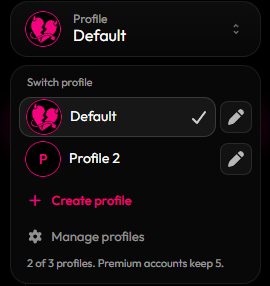
Each profile keeps its own styling and links. Every profile uses your account username, so switching changes what's on your page. Want a look at its own address? Give it an [alias](/badges-and-perks/aliases).
**Where to find it:** the profile switcher in the sidebar.
| | Free | Premium |
| - | - | - |
| Profiles per account | 3 | 5 |
Profile tokens give you extra slots on top of these. You can earn one from [Invites](/grow/invites).
 ## Create a profile
Click the profile switcher in the sidebar.
Click **Create profile** and give it a name (up to 32 characters).
You're switched to the new profile right away. Customize it like normal.
## Rename, switch or delete
* **Switch:** pick a profile from the list.
* **Rename:** click the pencil next to a profile.
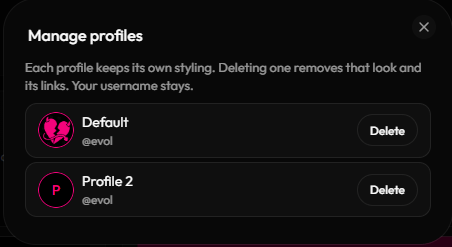
* **Delete:** open **Manage profiles**. Deleting a profile removes that look and its links. Your username stays. You always keep at least one profile.
## Create a profile
Click the profile switcher in the sidebar.
Click **Create profile** and give it a name (up to 32 characters).
You're switched to the new profile right away. Customize it like normal.
## Rename, switch or delete
* **Switch:** pick a profile from the list.
* **Rename:** click the pencil next to a profile.
* **Delete:** open **Manage profiles**. Deleting a profile removes that look and its links. Your username stays. You always keep at least one profile.
 This documentation is built and hosted on [Mintlify](https://mintlify.com), a developer documentation platform.